Studio Project 01
The Commons
Website Development + CRM Integration
A custom membership website connected to a working business inquiry system.
- Scope
- Website Development · API Integration · CRM Integration · Deployment & Verification
- Stack
- Eleventy · Vercel Functions · Cloudflare Turnstile · HubSpot
The overviewWhat it is and why it matters
01
The Need
For a membership-based business, collecting interest is only the first step. Inquiries also need to be validated, organized, and made accessible through the tools the business uses.
02
What We Built
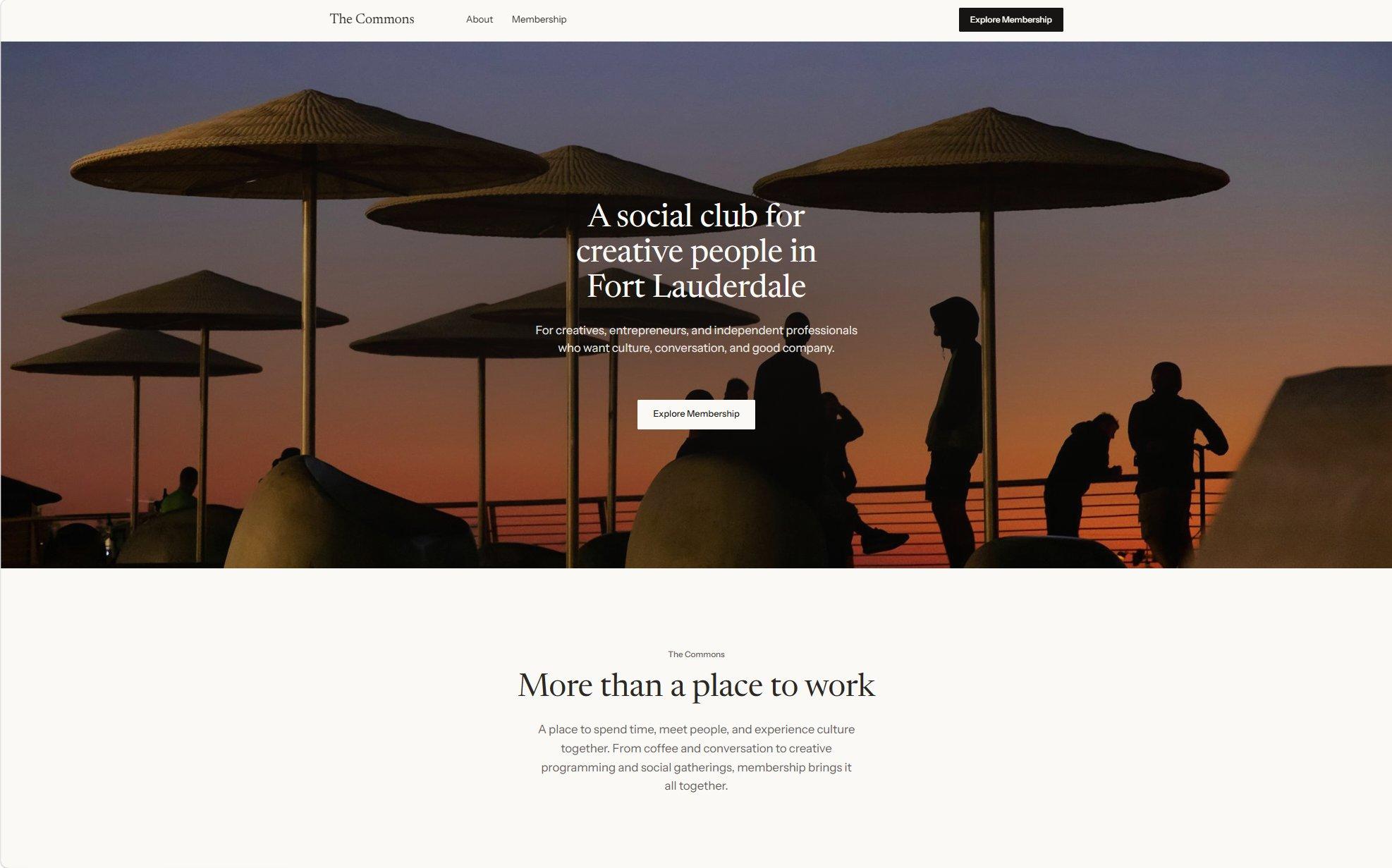
We developed The Commons, a membership-based website designed to demonstrate a connected customer inquiry and CRM workflow.
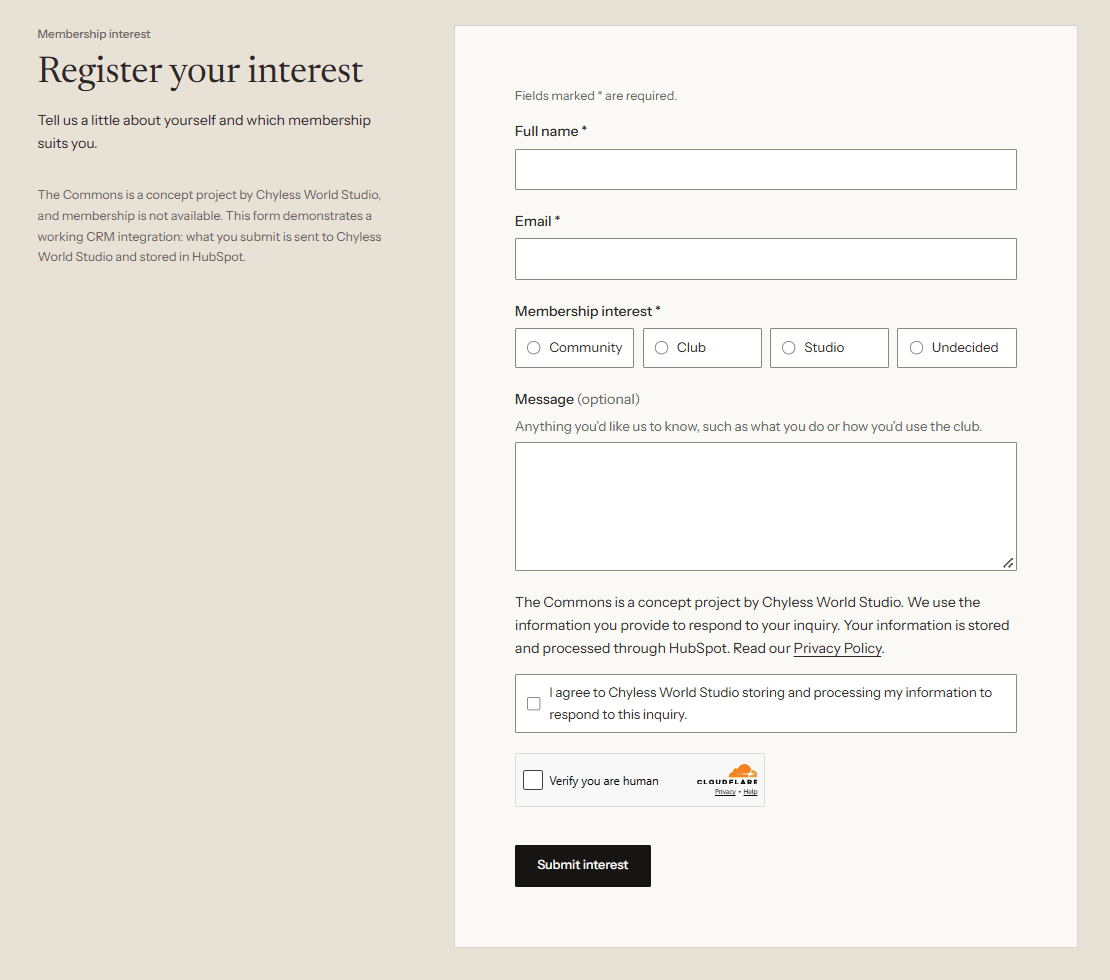
The project includes a custom website, membership inquiry form, automated submission handling, bot verification, and a HubSpot CRM integration.
03
How It Works
- 01VisitorA visitor completes the membership inquiry form.
- 02Website + serverThe system validates the information, checks consent, and verifies the submission.
- 03HubSpot CRMAccepted inquiries are automatically recorded in HubSpot CRM.
- 04VisitorThe visitor receives confirmation or an error message.
If any check fails, the visitor sees a clear message — and nothing is sent to the CRM.
04
Why It Matters
Instead of manually copying information from website inquiries into a separate system, businesses can connect the two.
This approach can reduce repetitive data entry, keep information organized, and create a foundation for future workflows such as appointment requests, onboarding, and follow-up communications.
Where this pattern could apply
- Consultation and quote requests
- Appointment and booking requests
- Client intake and onboarding forms
- Event RSVPs and waitlists
Possible applications — not features of The Commons.
The technical layerHow it works underneath — expand a section for the full detail
05Behind the Build
The Commons connects four systems. Each one has a single job, and the order they work in is what makes an inquiry trustworthy by the time it reaches the CRM.
Four systems, one job each
Website
Eleventy · JavaScript
What it does
A static website generated with Eleventy. One small JavaScript file checks the form in the browser and sends it to the server.
Why it matters
Static pages are fast and inexpensive to host. Checking the form in the browser gives visitors instant, accessible feedback — but it’s a convenience, not a safeguard, because anything in a browser can be bypassed.
Serverless function
Vercel · Node.js
What it does
A single function on Vercel receives each inquiry, re-checks everything, verifies the visitor with Cloudflare, and sends accepted inquiries to HubSpot.
Why it matters
The server is where rules can actually be enforced and credentials kept private. A serverless function runs only when an inquiry arrives, so there’s no separate server to maintain.
Bot verification
Cloudflare Turnstile
What it does
The form includes a Turnstile check that produces a one-time verification token. The server sends that token, with a secret key, to Cloudflare to confirm it’s genuine.
Why it matters
Bots can skip a website entirely and post straight to its server. Verifying the token on the server — and confirming it was issued for The Commons’ own website — means a submission can’t simply claim to come from a person.
CRM
HubSpot Forms API
What it does
Accepted inquiries are sent to HubSpot through its Forms API, which records the visitor’s details and consent as a contact.
Why it matters
Inquiries arrive where the business manages relationships — organized and searchable — instead of in an inbox waiting to be retyped.
How a submission travels
- Inquiry sent. The browser sends the form data and the one-time Turnstile token to the function over HTTPS.
- Verification requested. The function sends the token and its secret key to Cloudflare’s verification service.
- Verification returned. Cloudflare answers whether the token is genuine, and which website it was issued for.
- Inquiry recorded. Only after verification, the function sends the mapped fields and consent to HubSpot’s Forms API.
- CRM responds. HubSpot accepts the submission or returns an error.
- Visitor informed. The function returns success or a specific error, and the website shows the visitor a matching message.
Cloudflare and HubSpot never communicate with each other. The function coordinates both, and holds the only credentials.
Eight checks before the CRM
- 01The right kind of requestOnly form submissions are accepted.
- 02Hidden spam trapAn invisible field that people never fill in, but automated scripts often do.
- 03ConsentThe consent box must be checked.
- 04Valid informationA name, a correctly formatted email, a recognized membership option, and a message under 1,000 characters.
- 05Verification token presentThe Turnstile check must have been completed.
- 06Configuration readyIf a required setting is missing, the form says inquiries are temporarily unavailable rather than failing silently.
- 07Cloudflare confirms the visitorThe token must be genuine and issued on an approved website address.
- 08Sent to HubSpotOnly now is the CRM contacted.
Each check stops the request the moment it fails, and the visitor gets a clear message. Nothing reaches the CRM until every check has passed.
Credentials and configuration
The website uses two kinds of keys. Turnstile’s site key appears in the page and is designed to be public. Everything that grants access lives only on the server, as environment variables set in Vercel:
- TURNSTILE_SECRET_KEY
- Lets the server ask Cloudflare to verify tokens.
- TURNSTILE_ALLOWED_HOSTNAMES
- The website addresses a valid token may come from.
- HUBSPOT_FORM_ENDPOINT
- Where accepted inquiries are sent in HubSpot.
Keeping these out of the code means nothing sensitive is published with the website, and settings can change without changing code. Local copies are excluded from version control and from deployment uploads. Verification tokens are single-use, so the form requests a fresh one after every attempt.
Translating the data
The website and HubSpot describe the same information differently. The function translates each submission into HubSpot’s format:
| Website form | HubSpot | Notes |
|---|---|---|
| Full name | First name + Last name | Split at the first space. A single-word name leaves Last name empty (see Challenge 01). |
| Trimmed and format-checked on the server. | ||
| Membership interest | Membership interest (custom property) | Limited to Community, Club, Studio, or Undecided. |
| Message (optional) | Inquiry message (custom property) | Up to 1,000 characters. |
| Consent checkbox | Consent to process | Recorded with the exact wording the visitor agreed to. |
Consent and privacy
Next to the form, visitors are told that their information is stored in HubSpot, with a link to a privacy policy that names each service provider involved.
The server rejects any submission without consent, and sends HubSpot the same consent wording shown beside the checkbox — so the CRM record reflects exactly what the visitor agreed to. Submitting doesn’t sign anyone up for marketing communications.
Security decisions
Configuration, not code
The first version had the HubSpot address written into the code. It was moved into server configuration, and the function refuses to send anything unless that address points to HubSpot’s forms service.
Verify where the token came from
A Turnstile token is only accepted if it was issued on an approved website address — a site key is public, so tokens from elsewhere are refused.
Diagnose without collecting personal data
When HubSpot or Cloudflare rejects a request, the server logs only error types, field names, and reason codes. HubSpot’s raw error messages can repeat what a visitor typed, so they are never logged.
Honest feedback for visitors
Success appears only after the server confirms HubSpot accepted the inquiry. The submit button is disabled while sending to prevent duplicates, and the form explains when JavaScript is required.
06Challenges & Solutions
Two problems that surfaced during the build — how each was found, what caused it, and what it taught.
HubSpot’s required-field mismatch
- Symptom
- After deployment, some inquiries passed the website’s checks and bot verification, but HubSpot rejected them.
- Diagnosis
- We added privacy-conscious logging that records HubSpot’s error type and the affected field, without recording anyone’s personal information. The logs showed a required-field error for last name.
- Cause
- The website collects a single Full name field and accepts one-word names. The HubSpot form required a last name, so a one-word name left that field empty.
- Fix
- Last name was made optional in the HubSpot form, so single-word names are accepted.
LessonA workflow can be correct inside each system and still fail between them, because each system applies its own rules. Testing has to cover the handoff — otherwise the visitor sees an error and the business never receives the inquiry.
A stale Turnstile secret at runtime
- Symptom
- During the Turnstile integration, local verification kept using an older test secret, even after the environment file had been updated.
- Diagnosis
- The function’s code wasn’t the cause. Tracing what the running process could actually see showed it was still holding the old value.
- Cause
- Environment variables are read when a process starts. The development server had inherited the old configuration before the file changed.
- Fix
- Restarting the development server with the updated configuration resolved it.
LessonSource code, configuration files, and the values an application sees while running are three different things. When behavior doesn’t match the code, check what the running process actually has.
07Verification & Results
How the integration was tested, what was verified, and what the project doesn’t include.
How it was tested
- Syntax and build checks
- Targeted tests of failure paths — rejected and incomplete submissions
- A comparison of the committed source code against the deployed version
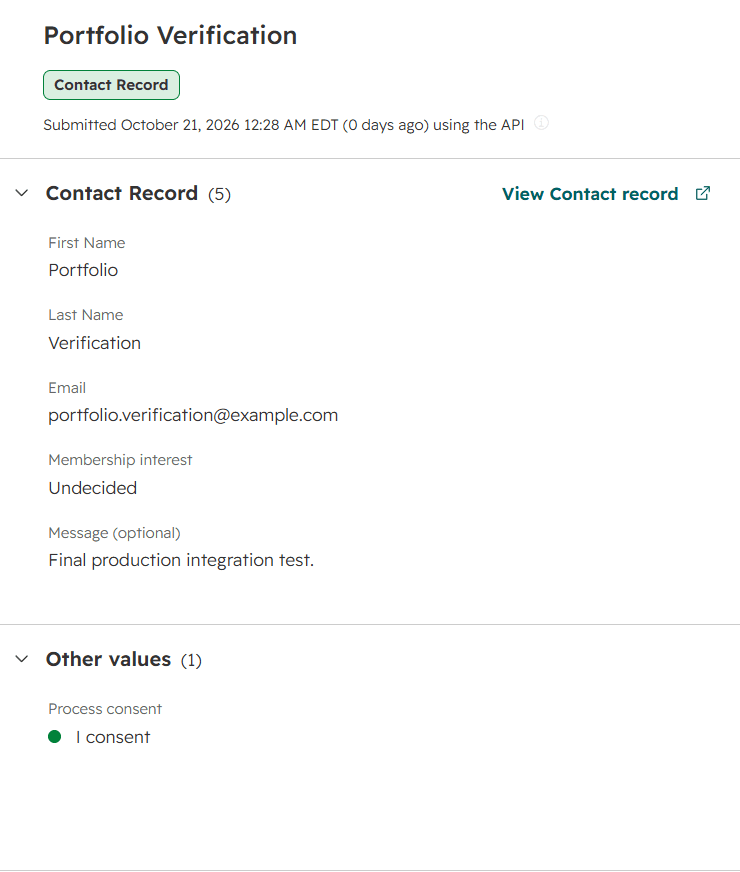
- A real inquiry submitted through the live website
As documented in the project’s technical case study.
What was verified
- The production inquiry was accepted and recorded in HubSpot, with every field mapped and consent captured (October 21, 2026).
- Re-checked for this case study: the live site is online, its inquiry endpoint refuses anything other than form submissions, and the deployed form includes the consent checkbox and Turnstile verification.
Scope
The Commons collects, verifies, and records inquiries. It does not include:
- Automated follow-up emails or notifications
- HubSpot workflows or sequences
- Analytics, reporting, or dashboards
- Membership management or payments
- An automated test suite
Role & tools
Built with AI-assisted development. AI tools — Claude Code and ChatGPT — assisted with planning, implementation, testing, and debugging.
Chyanne Robbins directed the workflow, configured the external services (Vercel, Cloudflare Turnstile, and HubSpot), made the technical and integration decisions, troubleshot issues, and verified the results.
08
The Result
A deployed, functioning website-to-CRM integration, verified through a successful production submission.
The Commons is an independent demonstration project showcasing a working technical solution that can be adapted to real business needs.
Have a similar workflow in mind?
Tell us what you’re trying to build, connect, or simplify.